No more hunting for trades 24/7 ChiPro finds them for you.

Crypto market · opportunities found · H4

ChiPro analyzes the crypto market around the clock, identifies fully formed trading setups and indicates a direction for each: LONG or SHORT.
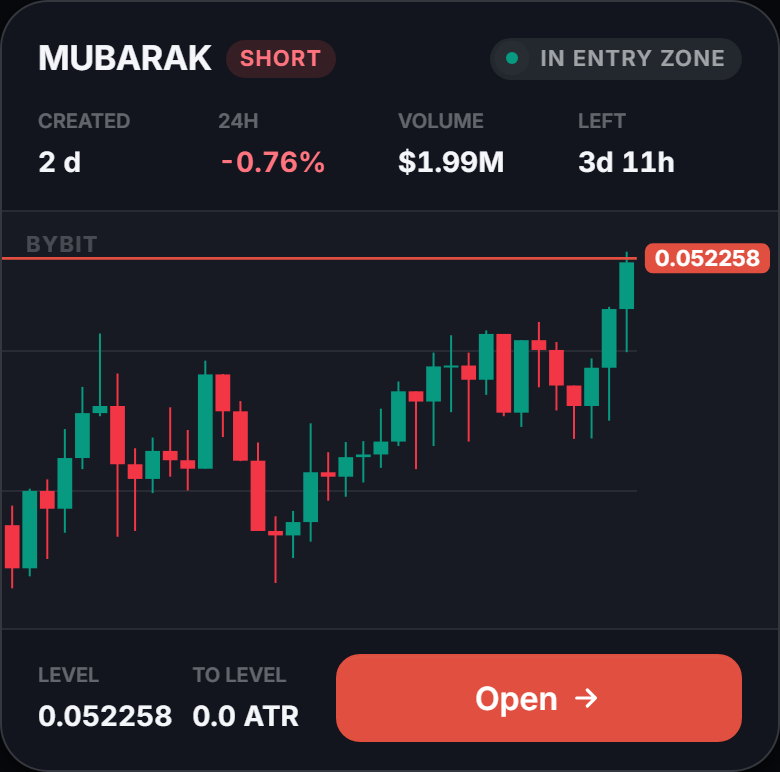
An opportunity card in the ChiPro app

83%of setups reached the target

Losing sleep so youdon't miss a trade? ChiPro does the work.You live your life.

One market. Two completely different workflows

  1. Scroll through hundreds of coins on the exchange
  2. Open dozens of charts
  3. Mark levels on every one
  4. Check volume and volatility
  5. Wait for price to approach the level
  6. Sit at the screen day and night
  7. Decide: LONG or SHORT
  8. Calculate position size based on your chosen risk
  9. Place your entry, Stop Loss and Take Profit orders on the exchange
  10. Watch the open trade
  11. Log the trade in a journal
  12. Recalculate statistics by hand
  1. Review a setup identified by ChiProthe coin, level and direction are already on the card
  2. Set the riskChiPro calculates the position size for you
  3. Open the tradeyour entry, Stop Loss and Take Profit orders are sent to the exchange together, and the trade is logged in your journal automatically
An opportunity card in the ChiPro app

Getting started is easy. Your first setups are already in the app.

  1. 1

    Start your free 7-day Pro trial

    Click the button and sign in with Telegram. Once you sign in or create an account, your Pro trial starts and you are taken to the app.

  2. 2

    Browse setups

    Pick a coin from the feed to see its direction (LONG or SHORT), key level and chart.

  3. 3

    Turn on notifications

    Choose an exchange and turn on "New setups". ChiPro will notify you of new setups, so you do not need to keep checking the feed.

Works right in your browser. View setups without connecting an exchange account. No card required. No automatic charges.

Where to use ChiPro

Open ChiPro in the browser on your computer or phone. For quick access, add the app to your phone's home screen. Telegram lets you sign in to the app and receive notifications.
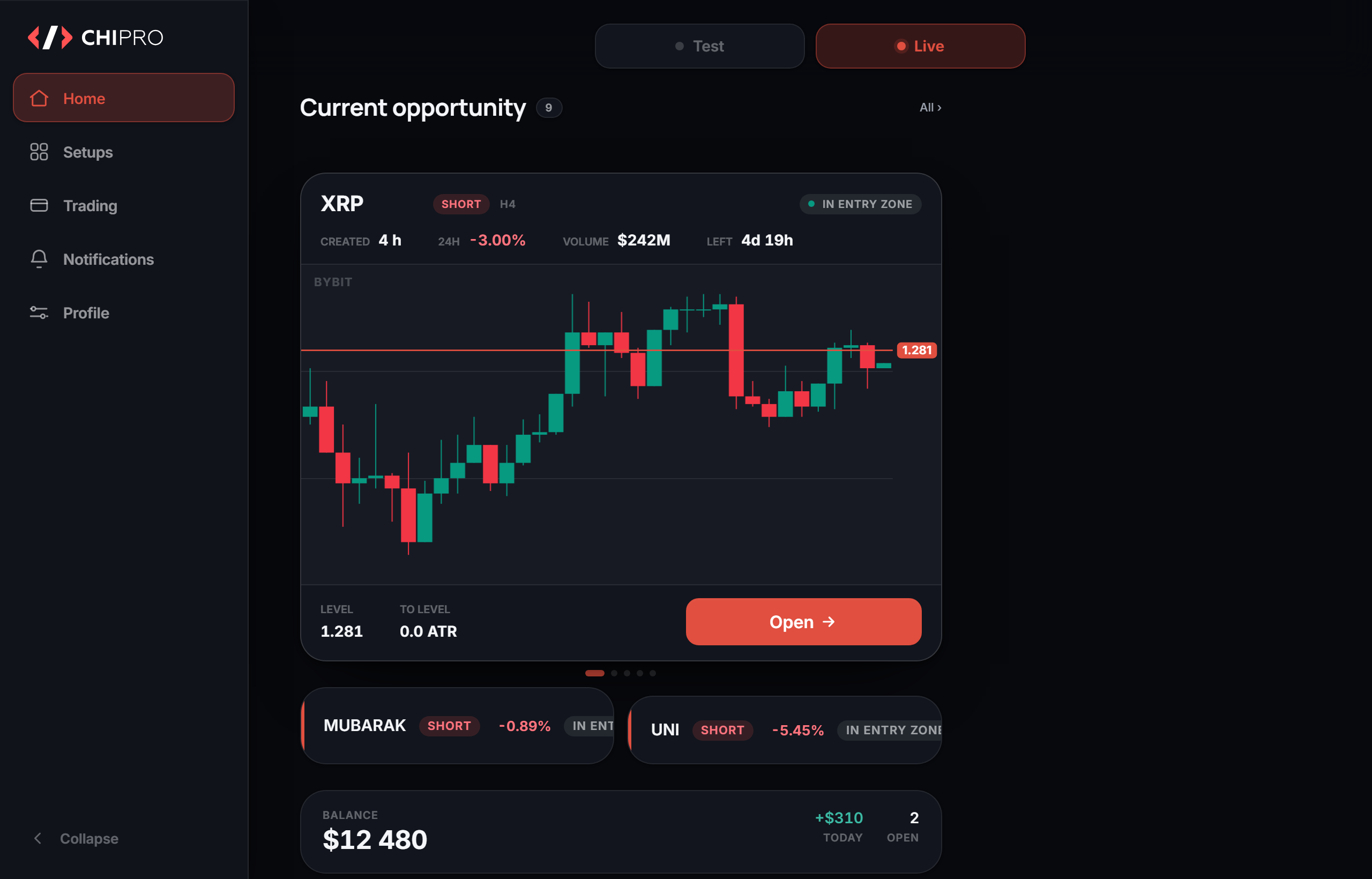
ChiPro in the browser: the workspace
The web app - a full workspace
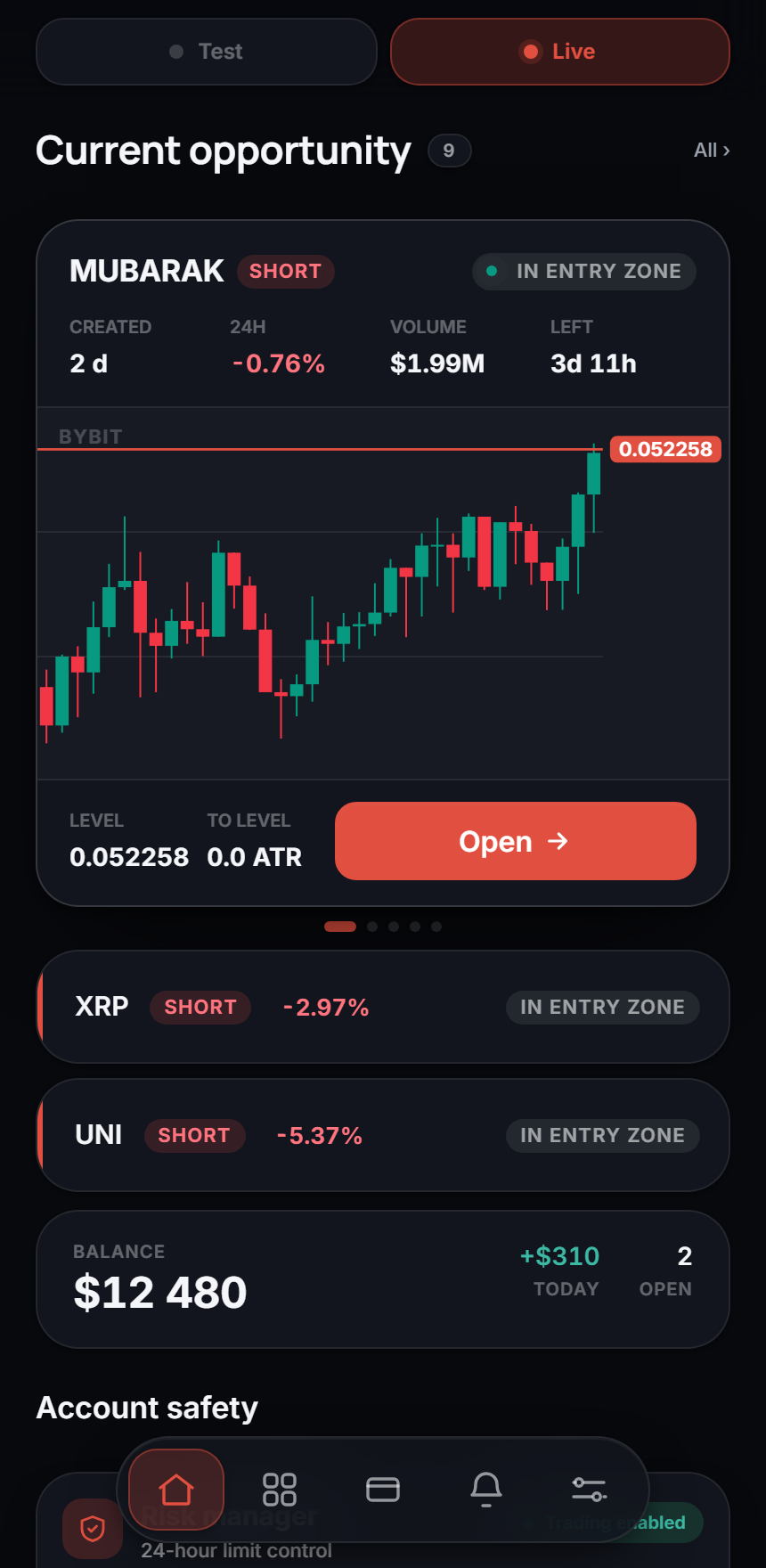
ChiPro on the phone: the same feed of setups
The mobile app - access at any moment
Карточка сигнала в Telegram-канале ChiPro
The Telegram interface - notifications about new setups

Open a chart with the key level already identified.

ChiPro finds setups for you. Each card shows the coin, direction and key level, so you can go straight to assessing the setup.

  • Coin and direction - the instrument and the LONG or SHORT direction.
  • Time - when the setup was identified and how long until it expires.
A setup card in the ChiPro app
  • Context - the 24-hour price change and trading volume.
  • Level and current price - the key level, the distance to it and the status.

Get notified when a new setup appears and when price approaches its key level.

Turn on new setup notifications and set your own zone around the level. ChiPro will tell you when price enters it. You can also set alerts for specific prices.

What each parameter means
  • Instrumentthe coin the setup was identified for
  • Direction of the movewhich way the setup points
  • Age of the setupwhen the setup was identified
  • Time lefttime remaining before the setup expires
  • Status of the setupin the entry zone, close or far
ChiPro setup card: all parameters in one place
  • Change over 24 hourshow the instrument moved over the last day
  • Volumehow much the instrument is traded
  • Key level on the chartthe working zone of the setup
  • To the levelhow far the price still has to go
  • ATRthe instrument's average price range over 4 hours

Works out the direction

Finds setups with a high historical probability of moving the way the signal points.

Calculates the level

Shows the price the current setup is heading for.

Measures the scale

Converts the distance to the level into fractions of the instrument's average move.

Tells you at once

Publishes a new opportunity the moment it appears.

You do not have to decide on a single number. The context of the setup is gathered in one card.

How notifications work
  • New setupsPro: get a notification with a setup card whenever a new setup is identified on your chosen exchange. Enable "New setups" in notification settings.
  • "Current opportunity" zonePro: choose how close price needs to be to the key level. When price enters your selected zone, you receive a notification and the setup appears in "Current opportunity".
  • Price alertsSet a price alert for a setup: up to 30 alerts in Pro, or one alert per publicly shared setup in Free.
  • TradesPro: notifications when a trade opens or closes, reaches +1R, +2R or +3R, or an order is placed or cancelled.
  • Where you receive notificationsIn the app (in the "Notifications" feed and as push notifications on your phone or computer), via Telegram, or both. Choose your preferred channels in settings.
How much manual work ChiPro takes off your hands

Every trade begins long before the position is opened. With the search.

ChiPro finds opportunities while you get on with your day

Finding a strong trading opportunity is what takes most of a trader's time: dozens of charts, hundreds of moves and the constant fear of missing the one that mattered. Most of that work ends in nothing.

ChiPro takes the search off your hands. The system reads the crypto market around the clock and speaks up only when a setup deserves attention.

Without ChiPro

Scanning coins, opening charts, looking for levels and constantly checking the market.

With ChiPro

An opportunity card in the ChiPro app

A feed of identified setups, a key level and direction on each card, and notifications about the events that matter.

ChiPro does hours of market analysis for you, every day.

Instead of watching charts non-stop you get opportunities that are already prepared and worth a look. That is why ChiPro is a tool for deliberate trading, not just a signal generator.

Every day the market produces thousands of moves. ChiPro picks out the ones that genuinely deserve your attention. But how often do those setups reach the target - and can you check the result yourself?

See why ChiPro can be trusted

83% of identified setups reached their target. You can verify the results.

Trust you can check

The result is based on about 13,500 setups on Bybit and Binance. The history shows every outcome - setups that reached their target and those that did not.

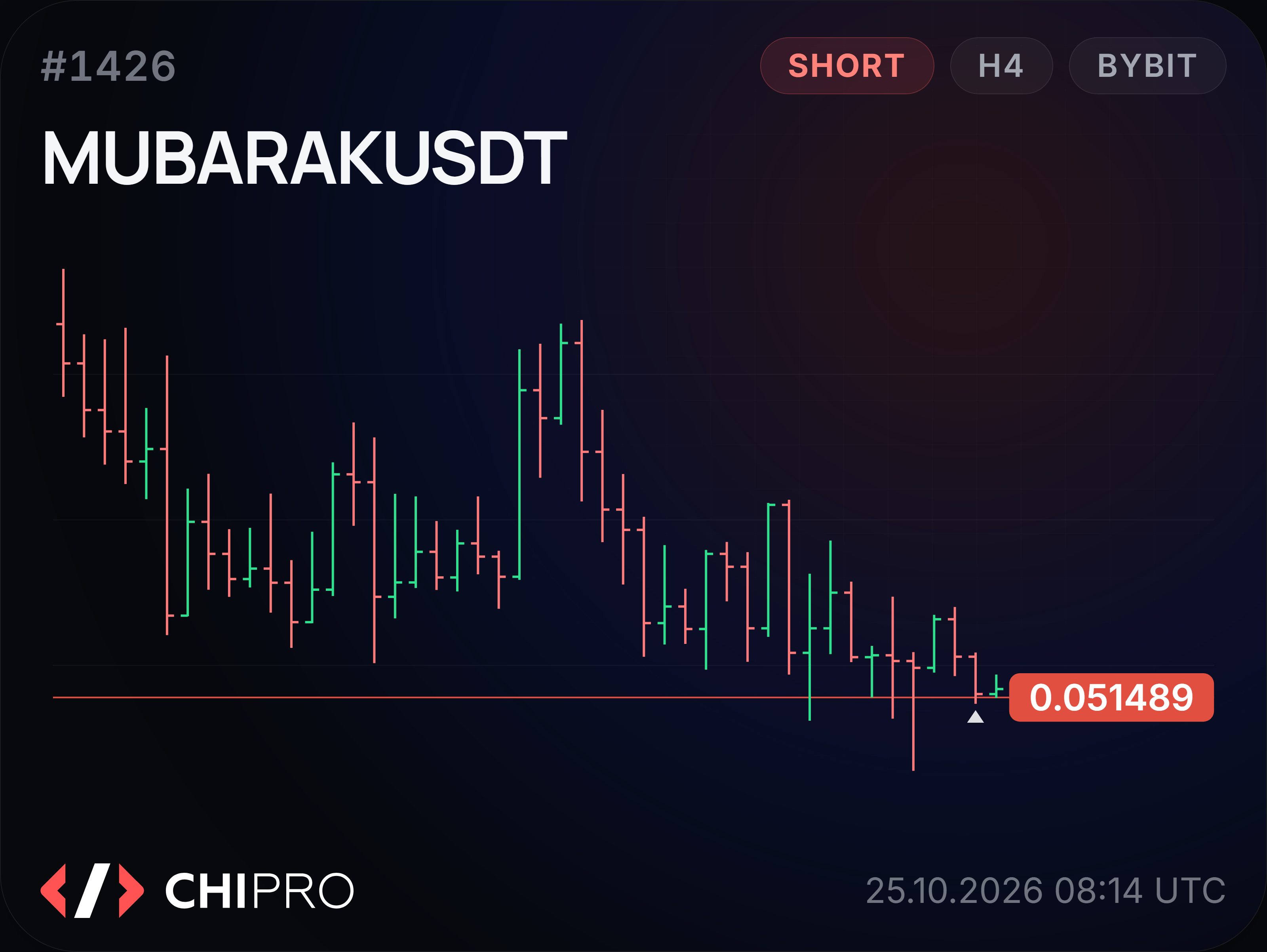
MUBARAKSHORTH4level 0.051489
0.051489
83% of setups reached the target target - 1 ATR in the direction of the signal historical data from Bybit and Binance, 1.7 years

A setup reaches its target when price moves 1 ATR from the identified level in the indicated direction within five days.

The model's history is open - together with every outcome

The table keeps every setup found, not only the successful examples.

DateInstrumentDirectionLevelStatusHash
24.10.2026 08:00 UTCSTXSHORT0.3066target reached4cd70364…4d79cbCheck
24.10.2026 08:00 UTCXRPSHORT1.28target reachedcbba918c…11a9e6Check
24.10.2026 08:00 UTCMNTSHORT0.5168target reachedc67d7a96…b3bf0dCheck

83% is the figure across the full history. Each setup shows only its own recorded outcome. The model's full setup history is available in the app.

How the result is calculated

The target is a price move of 1 ATR from the identified level in the indicated direction. ATR here is the Average True Range on the coin's 4-hour chart (H4-ATR), so the target matches each coin's volatility.

Each setup has five days to reach its target. If price moves 1 ATR in the indicated direction, the setup is marked "target reached". Otherwise, it is marked "target not reached" and remains included in the calculation.

This measures how often identified setups reach their target, not how profitable trades are. Your trade outcome depends on your entry, Stop Loss, fees and execution. Historical results do not guarantee future results.

Over the past 1.7 years ChiPro has recorded about 13,500 setups on two exchanges - Bybit and Binance. In 83% of them the price reached the given level within the setup's lifetime.

One stream of signals. The same rules for recording the result. The whole history is open to checking.

83%of setups reach the target
~13,500setups on two exchanges
1.7 yearsof historical data
How long it takes to reach the target

Most setups reach the target long before the lifetime runs out

ChiPro does not ask you to wait five days. Five days is the maximum time a setup stays live in the feed.

How quickly the target was reached, among the setups that reached it

4 hours18%
12 hours46%
24 hours66%
48 hours84%
72 hours91%
  • 55%of all signals reach the target within the first day
  • 16 hoursmedian time to the target
  • 70%reach the target within two days
  • 83%the final figure by the end of the fifth day

If the price has not reached the level in five days, the setup is closed honestly as one that did not work out.

What happens after the target is reached

The target is one average move. The potential is often larger

ChiPro records the target as reached at a distance of 1 ATR in the direction of the signal. Historically, though, the market often keeps going further.

2/3of all the setups found travel twice the target distance
9,9%median move among the setups that reached the target

ChiPro records a clear, measurable target without promising that the move will stop there.

How to verify a digital seal

Statistics are easy to draw. That is why every signal leaves a trace that cannot be faked

Honesty you can verify

New opportunities are published in an open Telegram channel before the outcome is known. Along with the signal we publish a digital seal - a SHA-256 fingerprint of the record that already contains the future review of the setup.

Changing the record after the fact without being noticed is impossible: the seal is already in the subscribers' hands.

  1. ChiPro finds an opportunity
  2. Published in the Telegram channel + a digital seal
  3. The setup develops, the outcome is recorded
  4. The record is revealed - the fingerprint can be recomputed
The record matches the published fingerprint
a89b60421a2a9c54…a6f736b6a7bdf420
publication #1406 · SHA-256 · revealed 25.10.2026 08:11 UTC

Trust appears not because ChiPro asks you to believe the statistics, but because you can check them yourself.

Setup found. Everything for the next step is in ChiPro.

The whole trading process - in one workspace

From evaluating an opportunity to reviewing the result - work in one app.

The ChiPro workspace: market opportunities right now
Current opportunity. The feed of setups, the key level and the entry status.

Preparing and opening a trade

Connect a Bybit or Binance account. Set the entry, Stop Loss and Take Profit on the chart and open the trade from ChiPro.

Manage your risk

Enter the amount you are willing to risk, and ChiPro calculates your position size. Set a daily loss limit.

Trade journal and performance statistics

Trades and results are saved automatically. Track your performance in R, win rate, profit factor and drawdown.

Test your trading decisions in the simulator

Open a historical setup, choose a scenario and watch how price unfolded without placing real trades.

From setup to review
  1. ChiPro found an opportunityNotification · card · direction
  2. You studied the cardLevel · ATR · distance · lifetime
  3. You opened the tradeEntry · position size · trading account
  4. You set the size of the riskRisk allowed per trade
  5. You set the Stop Loss and Take ProfitRight when the position is opened
  6. You watched the positionManaging the trade inside ChiPro
  7. You closed the tradeThe result was saved in R
  8. The trade appeared in the journalStatistics updated without any typing

The trade. Entry, stop and target are set on the chart; size and leverage are calculated from the risk you set, with fees accounted for in advance. Post Only, stop and take types are in the advanced settings. Protection goes to the exchange together with the entry.

No manual spreadsheets, no re-entering data, no switching between several services.

How risk management works

Manage risk by your own rules

You set the limits, ChiPro keeps them. The rule holds until the end of the daily window and cannot be cancelled at the moment you feel like cancelling it.

  • the risk per trade is set before the entry - the position size is calculated from it;
  • daily limit: a percentage of the deposit, a sum of money or a number of losing trades;
  • the 24-hour window opens with your first trade; inside the window the limit does not change;
  • limit spent - new trades are closed until the window ends, the simulator stays open;
  • what is left of the limit is on the home screen, before you open the next trade.
The ChiPro risk manager: daily limit and the state of the window

ChiPro gives you the structure. The decision and the responsibility stay with the trader.

What is saved after a trade closes

The work does not end when the trade closes

It is after the result that you can see what worked, which decisions were good and what to change next time. ChiPro saves the trade automatically, records the result in R and adds it to the journal.

Trade closed Journal Statistics Reviewing decisions Next decision Every trade becomes part of your experience

Trading, analytics and progress - parts of one process

Finding an opportunity is only the beginning. The real value appears when every stage of trading is connected to the next.

One trade

Trading

The whole stream of opportunities found · opening and managing the trade · connected trading account · Stop Loss and Take Profit · risk size setting

Analytics

Direction and target level · ATR and distance to the level · age and status of the setup · the model's history · outcomes you can verify

Progress

Trade journal · result in R · statistics · the patterns of your own trading · reviewing decisions and progress over time

ChiPro helps you not only find opportunities but build a systematic approach, where every trade becomes part of your experience.

Try the simulator

Try ChiPro in the simulator before trading for real

Simulation

The simulator lets you work through real historical setups and test your own decisions without risking money.

  • see the setup at the moment it appeared;
  • judge the direction, the level and the ATR;
  • choose your own entry and risk;
  • watch how the price developed;
  • compare your decision with the actual outcome.
Open the simulator
The ChiPro simulator: marking up a trade on a historical setup

Test the approach in practice first. Only then decide whether to use it with real money.

How entry and stop affect the result

Break-even depends on more than Win Rate

The closer to the level you enter, the shorter the stop - and the lower the bar for break-even. The target of a setup is fixed: 1 ATR. The Stop Loss is the trader's own choice. So the ratio of risk to target depends on how close to the level the trade is opened.

What ChiPro gives you

The level, the direction and the target - 1 ATR in the direction of the signal.

+

What the trader decides

The entry and the Stop Loss - they set the ratio of risk to target.

What Win Rate break-even needs

25%1:3 stop - ⅓ of the way to the target
20%1:4 stop - ¼ of the way to the target
16,7%1:5 stop - ⅕ of the way to the target

A worked example at a Win Rate of 30% and a ratio of 1:4

3 × +4R − 7 × 1R = +5R per ten trades

This is arithmetic, not a promise of returns. The real result depends on execution, fees, slippage, discipline and the size of your risk.

Free - explore ChiPro.Pro - work with the full setup feed.

The first 7 days of Pro are free. The same features as the paid subscription, with no card and no automatic charges.

Free

Free and with no time limit

Explore ChiPro and test how it works.

  • setups shared in the public channel, about two per day;
  • charts for published setups;
  • setup history and digital seal verification;
  • simulator with saved progress;
  • one price alert per publicly shared setup;
  • learning materials.
Open Free

No card needed.

The full workflow

Pro

The full feed and tools for daily work.

Everything in Free, plus:

  • all identified trading setups;
  • new setup notifications for your chosen exchange;
  • the "Current opportunity" zone and alerts when price enters it;
  • up to 30 price alerts;
  • opening and managing trades via Bybit or Binance;
  • position size calculation, risk management, Stop Loss and Take Profit;
  • automatic trade logging and performance statistics.
30 days49 USDT
90 days129 USDT
270 days329 USDT
  • full access to all Pro features throughout your subscription period;
  • one payment, nothing charged afterwards;
  • a period can be paid for in advance - no days are lost.
Pay for Pro Try 7 days of Pro free

The trial is available once per account. Pay for your subscription on the website in USDT via the TRON network (TRC20). Subscriptions do not renew automatically. If you renew early, the new subscription period begins when your current one ends.

How to pay and renew

In USDT over the TRON network (TRC20). You choose the period, get an invoice with the address, the exact amount and a QR code, and send USDT from your wallet or from an exchange. Access opens automatically once the network confirms, usually within a couple of minutes.

Subscriptions do not renew automatically: you pay for each renewal with a separate invoice. The bot will remind you a few days before your subscription ends. The new period is added to the end of the current one, so renewing early costs you nothing.

You can request a refund for any unused full days of your paid subscription. Use the /refund command in the bot or contact the support bot; your refund will be sent in USDT to the wallet address you provide within 10 days. For details, see "Payment and refunds".

What happens after the 7-day free trial

After 7 days, your Pro trial ends and your account switches to the Free plan, which has no time limit. You will not be charged: no card is required, and subscriptions do not renew automatically. To continue using Pro, purchase a subscription on the website.

Questions and answers

What is included in the 7-day free trial?
Everything in Pro: the full setup feed, new setup notifications for your chosen exchange, the "Current opportunity" zone, up to 30 price alerts, opening trades via Bybit or Binance, risk management, a trade journal and performance statistics. The free trial is available once per account. No card or payment required.
What happens after the trial?
When your Pro trial ends, your account switches to the Free plan. You will not be charged: no card is required, and subscriptions do not renew automatically. To continue using Pro, purchase a subscription on the website.
What notifications can I get?
With Pro, you can receive notifications about each new setup on your chosen exchange and when price enters your selected zone around the key level. Price alerts: up to 30 in Pro, or one per publicly shared setup in Free. For your trades, you can receive notifications when a trade opens or closes, reaches +1R, +2R or +3R, or an order is placed or cancelled. Receive notifications in the app, via Telegram, or both. Choose your preferred channels in settings.
Do I need to connect an exchange account to try ChiPro?
No. You can browse the setup feed, charts and history, and use the simulator without connecting an exchange account. You only need to connect a Bybit or Binance account to place trades from ChiPro.
Which markets does ChiPro cover?
ChiPro covers USDT perpetual futures on Bybit and Binance. Setups are identified on the 4-hour (H4) chart using only closed candles.
Where can I use ChiPro?
In the browser on your computer or phone. For quick access, you can add the app to your phone's home screen. Telegram lets you sign in to the app and receive notifications.
Who opens the trade?
The user. You choose the parameters yourself and confirm every action in the ChiPro interface. Once confirmed, the order is signed with your key on your device and goes to the trading venue directly, bypassing ChiPro's servers. ChiPro does not start trading operations on its own and does not store keys with trading permissions.
Where are my funds held and my API key stored?
Your funds and digital assets remain in your own account on the connected exchange. ChiPro does not hold or manage them. Your exchange API key is stored on your device. Orders are signed on that device, and the key itself is never sent to ChiPro servers.
What does the 83% figure mean?
It is the share of identified setups in which price moved 1 ATR from the level in the indicated direction within five days. It is based on the model's history of about 13,500 setups on Bybit and Binance. It is not the win rate: a trade's outcome depends on the entry, Stop Loss, fees and execution. Historical results do not guarantee future results.
Why are setups tracked for up to five days?
Five days is the maximum tracking period for a setup, not the expected time to reach its target. The median time to target is 16 hours. If the target is not reached within five days, the setup is marked "target not reached".
What am I paying for?
For access to ChiPro's information and analysis software. The payment is not used to fund an exchange account and is not passed to ChiPro for making trades.
How much does Pro cost?
49 USDT for 30 days, 129 USDT for 90 days or 329 USDT for 270 days. The first 7 days of Pro are free - once per account, with no payment and no card.
How do I pay?
In USDT over the TRON network (TRC20). You choose the period, get an invoice with the address, the exact amount and a QR code, and send USDT from your wallet or from an exchange. Access opens automatically once the network confirms, usually within a couple of minutes.
Is there auto-renewal?
No. Nothing is charged without you: you pay for each next period with a separate invoice. A few days before the period ends the bot will remind you. A new period is added to the end of the current one, so renewing early costs you nothing.
Can I get a refund?
Yes, for the full unused days of the period you paid for. Send the request with the /refund command in the bot or through the support bot; the refund arrives in USDT to the address you give, within 10 days. The details are in the «Payment and refunds» section.
Can I connect a trading account?
Yes. Once it is connected you can open and manage trades inside ChiPro.
Can I set the risk myself?
Yes. The size of the risk, the Stop Loss and the Take Profit are yours to set - in line with your own strategy.
What happens after a trade is closed?
ChiPro records the result in R, adds the trade to the journal and updates your personal statistics.
Can I check the model's history?
Yes. The whole history is available together with the outcomes and the digital seals. A published fingerprint can be recomputed by anyone.
Does ChiPro guarantee profit?
No. ChiPro helps you find and assess market setups, manage the trading process and review results. The decision to open a trade, and responsibility for the risk, always stay with the user.

While you go about your day, ChiPro analyzes the market.

It identifies trading setups, indicates a direction and notifies you. Get access to the full setup feed and try ChiPro in your trading workflow.

Full access for 7 days.

ChiPro is an information and analysis software service for analysing the crypto market and organising the user's own trading process. The user chooses the parameters of a trading operation and confirms the action in the ChiPro interface. The order is signed with the exchange key on the user's device and goes to the trading venue directly: the key is not transmitted to ChiPro's servers and is not stored there, and ChiPro has no access to the user's trading account. ChiPro does not take its own decisions to open, change or close a trade and does not start operations without an action by the user. The user's funds and digital assets are held in their own account at the trading venue - ChiPro does not take them into custody or under management.

ChiPro's information is produced by automated analysis of market data and is informational and analytical in nature. The materials are not individual investment advice. Historical figures and the results of analysis do not guarantee any future financial result. The decision whether or not to make a transaction is taken by the user alone.